Assalamu alaikum!
The latest Quran Gate update (version 1.9.5) brings the Quran page to life. You can now listen while you read, save the ayahs that move you, and share them with the people you love. Here's what's new.
Listen along, word by word
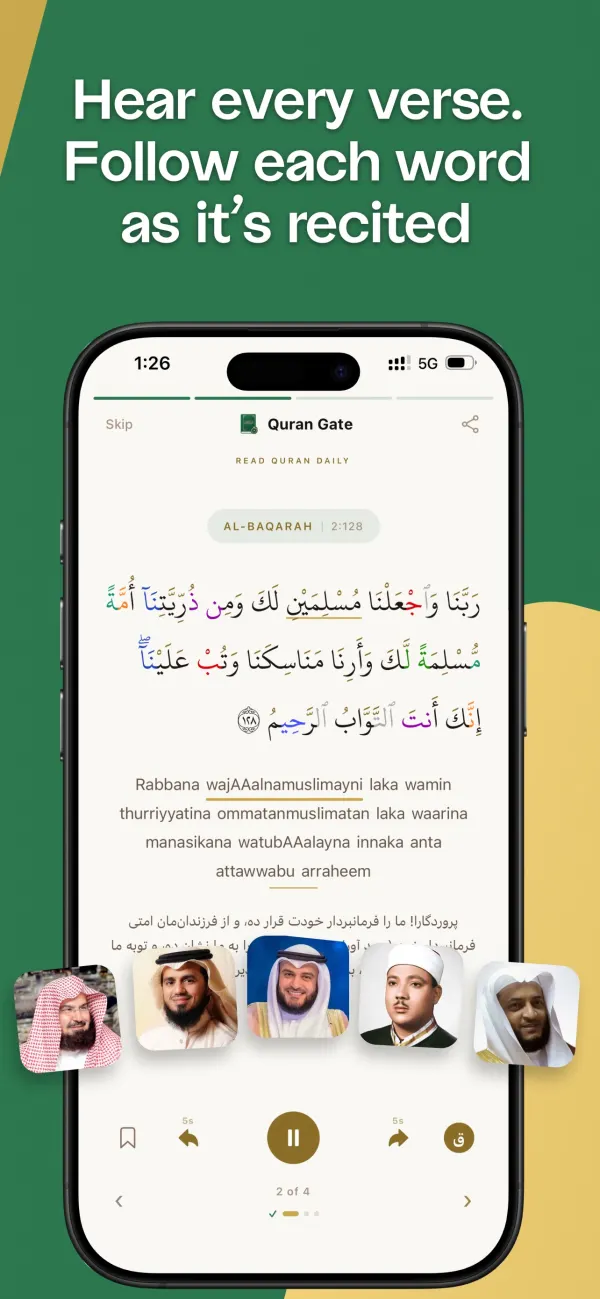
Tap play on any ayah to hear it recited. Choose from 6 renowned reciters in Settings → Quran Experience → Reciter.
As the recitation plays, each word is highlighted the moment it is recited, so you can follow exactly where the reciter is — a gentle help for improving your recitation and for learning ayahs you are memorising.
Audio streams over the internet; the Quran text itself stays available offline.
Bookmarks
Tap the bookmark icon on any ayah to save it. Your saved ayahs live in one list — open Bookmarks from the dashboard to jump straight back to them.
Share an ayah as an image
Tap Share ayah to turn a verse into a clean image card with its translation, ready to send to family or post to your story.
Your Quran, your way
New Quran preferences let you choose your Quran font and switch Tajweed colours on or off, alongside font size and transliteration. Find them in Settings → Quran Experience.
Also in this update
General bug fixes and improvements to keep your daily ritual smooth.
Update from the App Store or Google Play to get the new Quran page. JazakAllah khair for reading with us.